
Small business 14 min read
Free Quote Template for Tradesmen (UK, 2026): PDF, Word & Excel
Free, editable quote templates for UK tradespeople in Word, Excel and PDF. No sign-up, no email address, plus practical advice on pricing, VAT, exclusions and follow-up.
A PrimeStart guide for small businesses and trades

A quote is often the first piece of paper a customer sees from your business. Before they have seen your work in person, they have judged how organised you are from a few lines on a page. A clear, itemised quote with sensible terms makes it easier for them to say yes, and it protects you if the job changes halfway through.
We made these templates for UK tradespeople who are tired of starting from a blank page or a pay-to-use quoting app. They are free, they work offline, and you can edit every word. Below them you will find the practical parts: what a professional quote contains, the difference between a quote and an estimate, how to work out a job price, how VAT fits in, and how to send a quote and follow it up without sounding pushy.
Download your free quote template
Each template has the same structure, so you can switch between them. The trade versions only differ in their example lines, which show how a painter, builder, plumber or electrician, or gardener might word a line. Every example line is marked EXAMPLE and uses illustrative figures. They are not a price guide and they are not real jobs. Overwrite or delete them.
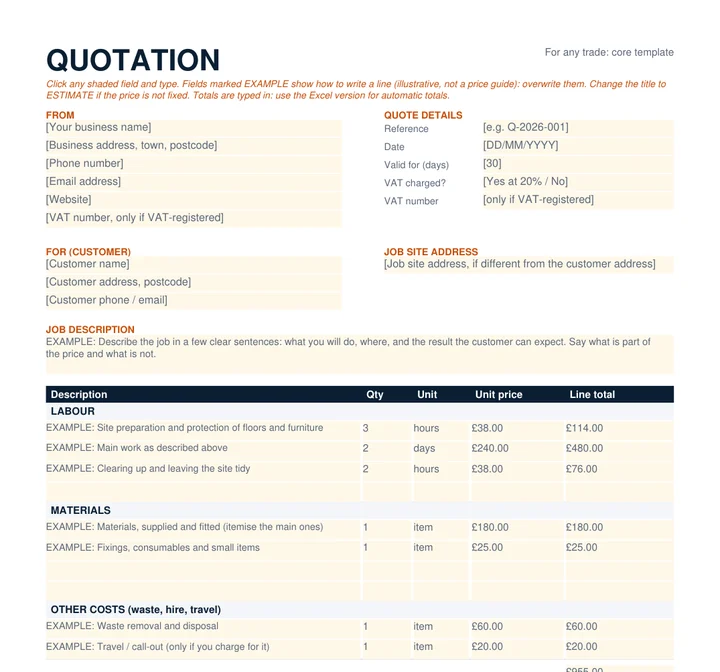
General trades
The core template. Example lines for any trade.
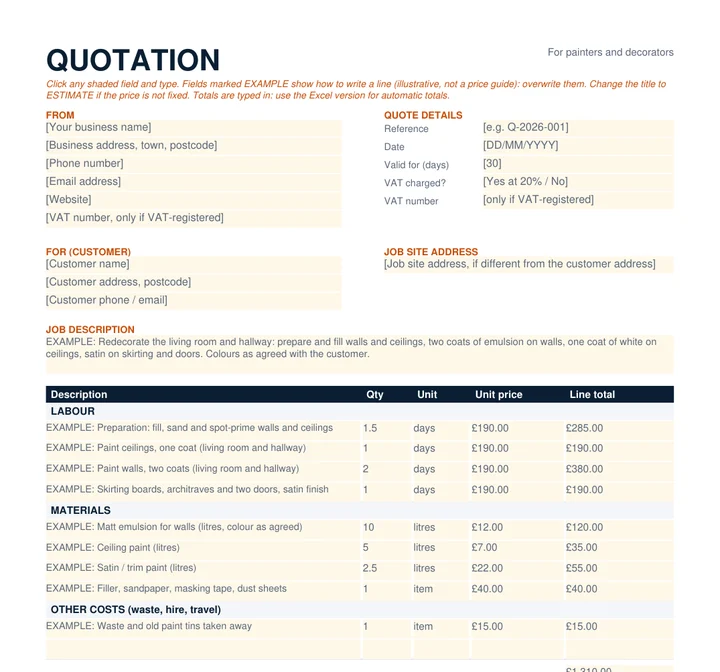
Painters and decorators
Example lines for painters and decorators
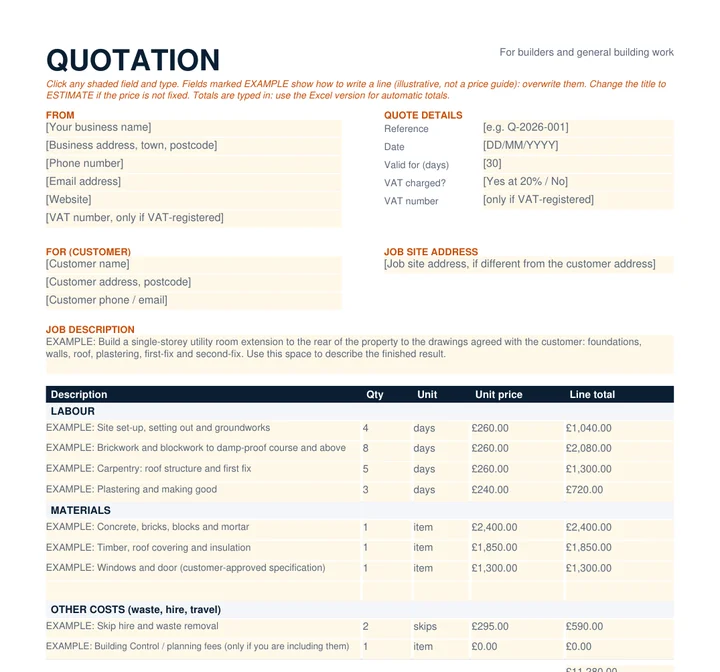
Builders
Example lines for builders and general building work
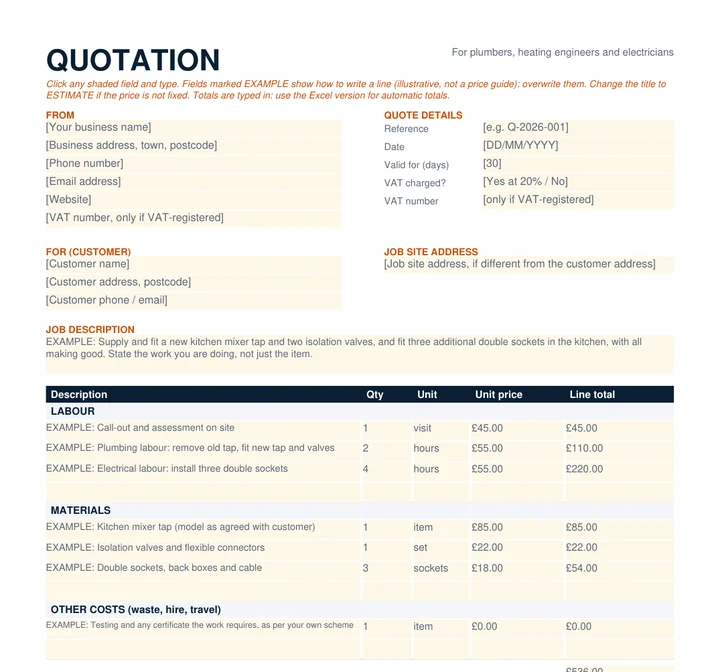
Plumbers and electricians
Example lines for plumbers, heating engineers and electricians
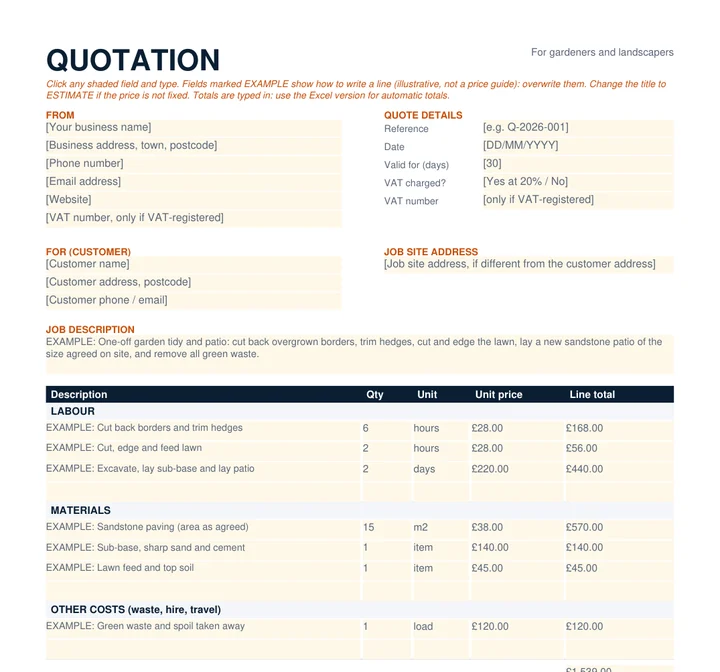
Gardeners and landscapers
Example lines for gardeners and landscapers
Which format should I choose?
- Excel (.xlsx) works out the line totals, subtotal, VAT and total for you. VAT is off until you choose Yes, and you can set the rate. It also works out valid-until dates, and a deposit and balance if you want them. This is the one to pick if you quote often.
- Word (.docx) is the easiest to restyle, add a logo to, and tailor wording in. Word does not add up for you, so type the totals yourself.
- PDF (fillable) opens in any modern PDF reader. Click a shaded field and type. It is the quickest for a one-off job, but you type the totals yourself.
How to use the templates in five minutes
- Add your business details at the top: name, address, phone, email, and your website if you have one. Add your VAT number only if you are VAT-registered.
- Fill in the customer and job site, then write two or three clear sentences describing the job and the result.
- Replace the example lines with your own labour, materials and other costs. One line per task is easier for a customer to follow than one big number.
- Check the exclusions and payment terms and change them to match how you work. These are suggestions, not rules.
- Save a PDF, send it, and note the date it expires.
What a professional quote contains
Whatever trade you are in, a quote customers trust usually covers the same ground. The templates include every item below.
- Your business details. Name, address, phone, email and website, so the customer knows who they are dealing with and how to reach you.
- A quote reference and the date. A simple number such as Q-2026-014 makes it easy to find the quote when the customer rings back.
- Customer details and the job site address. These are often different, for example with landlords and holiday lets.
- A description of the job. What you will do, where, and what the customer ends up with.
- An itemised breakdown. Labour, materials and other costs such as waste removal or hire, with quantity, unit and unit price.
- VAT, only if you are VAT-registered. Show the net price, the VAT and the total.
- The total. One clear figure, with any deposit and balance.
- Exclusions. What is not part of the price.
- Payment terms. Deposit, stage payments, when you expect to be paid and how.
- How long the price stands. A valid-until date.
- Customer acceptance. A name, signature and date, so there is a record that they agreed.
Quote vs estimate: why the difference matters
Customers and tradespeople often use the two words as if they mean the same thing. They do not, and the difference can decide who pays when a job costs more than expected.
| Question | Quotation | Estimate |
|---|---|---|
| What it is | A fixed price you offer for a defined piece of work | Your best guess at what the work will cost |
| Can the price change? | Generally not, unless the customer agrees extra work | Yes, but the final price should still be reasonable |
| When it suits | The work is clear and you can see everything you need to price | You cannot know the full scope until work starts, for example hidden damage |
| Wording to use | “Fixed price”, with exclusions listed | “Estimate”, “approximately”, and what could change the price |
Citizens Advice describes a quote as a fixed price the trader has promised, which generally cannot be increased unless the customer agrees extra work, and an estimate as the trader’s best guess, where the final price should be reasonable. Its guidance also says that a rise in your own costs after you gave a quote is not a reason to charge more. That is worth thinking about before you put a number on paper.
Where no price has been agreed at all, the Consumer Rights Act 2015 says a customer pays a reasonable price for the service (section 51), and the work must be done with reasonable care and skill (section 49). A written, itemised quote is the simplest way to make sure nobody has to argue about what “reasonable” means.
How to work out the price of a job
Most underpriced quotes come from forgetting a cost, not from choosing the wrong hourly rate. Work through the job in this order.
- Your day or hourly rate. Add up what you need to earn plus what the business costs to run (van, fuel, insurance, tools, phone, accountant, software). Divide by the days or hours you can really charge for. Chargeable time is less than working time, because quoting, travelling, paperwork, weather and holidays are all unpaid.
- Labour time. List the tasks and estimate the time for each, including preparation and clearing up. If someone helps, price their time too.
- Materials. List what you will buy, with quantities, and check current prices. Allow for waste and for a second trip to the merchant.
- Other costs. Skips, waste disposal, equipment hire, parking, permits you are including.
- A margin for the unexpected. If the job could change once you open it up, either allow for that or write it down as an exclusion or as a variation you will agree in writing.
- VAT, only if registered. Work out the price without VAT first, then add VAT on top.
| Illustrative example only: working out a day rate | |
|---|---|
| What you want to take home in a year (example) | £30,000 |
| Running costs for the year: van, insurance, tools, phone, accountant (example) | £9,000 |
| Total to cover | £39,000 |
| Days you realistically charge for (example) | 180 |
| Day rate to charge | £216.67 (about £217) |
Those numbers are made up to show the sum. Use your own. Note that income tax, National Insurance and a pension are outside this simple example; ask your accountant what to allow for.

VAT on a quote: what to check
You only charge VAT if your business is VAT-registered. GOV.UK says you must register if your taxable turnover goes over £90,000 in a 12-month period (checked 24 October 2026), and that you can register voluntarily below that. If you are not registered, do not show VAT on your quote and do not put a VAT number on it.
If you are registered, the standard rate is 20%. Some building work attracts a reduced or zero rate, for example certain renovation and new-build work, and the rules are detailed. GOV.UK’s VAT Notice 708, Buildings and construction, is the place to check, and your accountant can confirm which rate applies to your jobs. In the Excel template the VAT rate cell is open for you to change, and VAT stays off until you choose Yes.
A quote is not a VAT invoice. When the job is done, you issue an invoice that meets HMRC’s requirements for your business.
What to write: examples for each trade
Here are the kinds of lines the trade templates use. These are examples to give you ideas for wording. The figures are illustrative.
Explaining exclusions without scaring the customer
Exclusions are the part of a quote people skim and the part that matters most when something goes wrong. A list of exclusions is not an attempt to wriggle out of anything. It tells the customer exactly where the price stops, so they are not surprised later.
- Be specific. “Plastering” is vague. “Replastering of walls beyond the area shown on the drawing” is clear.
- Keep the tone factual. “Not included: moving large furniture” is better than a paragraph of warnings.
- Say what happens to extras. One sentence is enough: “Any extra work is agreed and priced in writing before it is carried out.”
- Explain it when you hand it over. A minute on the phone or on site stops most arguments before they begin.
Common quote mistakes
- One total and nothing else. Customers cannot compare it or see what they are paying for.
- No expiry date. Material prices change. A valid-until date lets you reprice.
- Leaving out waste, skips and travel. They are real costs, so list them.
- Vague descriptions. “Decorate lounge” can mean a lick of paint or a full strip and repaint.
- No exclusions. If you do not say what is not covered, the customer assumes it is.
- VAT confusion. Charging VAT when you are not registered, or forgetting it when you are.
- No payment terms. Say when you expect to be paid, and how.
- A quote that arrives days late. Many customers have already chosen someone by then.
- Typos in the price or the customer’s name. Read it once more before sending.
How to send a quote professionally
- Send it as a PDF with a clear filename, such as “Quote Q-2026-014 – Garden patio.pdf”.
- Write a short cover message rather than sending a bare attachment. For example: “Hi [name], thanks for showing me the [job] today. Attached is my quote for the work we discussed, valid until [date]. If anything needs changing or you have a question, ring or message me and I will update it. I could start from [date] if you would like to go ahead.”
- Send it quickly. Same day or next morning is a good aim while the job is fresh for them.
- Make it easy to accept. “Reply YES to this email, or sign and return the last page” is clearer than leaving them to guess.
- Keep a copy of what you sent, with the reference and the date.
Following up without pressure
Most customers who go quiet are busy, comparing, or waiting for a partner to agree. A polite follow-up is usually welcome. A suggestion:
- A day or two after sending: a quick message to check it arrived and offer to answer any questions.
- About a week later: one more note, mentioning that the price is valid until [date] and your next free start date.
- After that: let it go politely. “No problem if you have gone another way. If anything changes, I would be glad to help.” Many jobs come back later.
A good follow-up gives the customer something useful (a date, an answer, an offer to adjust the scope) rather than just asking “have you decided?”.
Making a quote look trustworthy
- Use a consistent layout and your own logo. Even a plain one gives the quote a professional look.
- Be clear and specific in the job description and the line items.
- Only mention insurance, memberships and accreditations you actually hold, and be ready to show proof if asked.
- Add a line pointing to examples of your work, such as a gallery on your website or a few photos in the same email.
- Check spelling and the arithmetic. Small errors can make a customer wonder what else might be wrong.
Frequently asked questions
Are these quote templates really free?
Yes. There is no sign-up, no email address to give us, no watermark and nothing to buy. Download them, edit them, and use them for your business.
Can I use my own logo?
Yes. In Word, insert your logo at the top of the page. In Excel, use Insert, then Pictures, and place it above the title. In the fillable PDF you can print a copy on your letterhead, or recreate the layout in Word.
Do the templates work out VAT for me?
The Excel version does. VAT is off by default. Choose Yes in the VAT cell, and set the rate, to add it. The Word and PDF versions show an example VAT line that you type in, or delete if you do not charge VAT.
Is a quote legally binding?
Once a customer accepts a quote, it is generally the agreed price for the work described. Citizens Advice says a trader generally cannot charge more than the quote unless the customer agrees to extra work. This article is not legal advice, so if a particular job is complicated or disputed, get advice from Citizens Advice, Trading Standards or your trade body.
Should I charge for quoting?
That is your decision. Many tradespeople quote free of charge for small jobs and charge, or refund against the job, for detailed quotes on large projects. If you charge, say so before you visit.
How long should a quote be valid?
There is no set rule. Thirty days is a common choice. Shorter suits jobs with volatile material prices. Put the date on the quote.
Can I edit the example lines and terms?
Yes. Everything is editable, and the example lines are there to be overwritten. The payment terms and exclusions are suggestions, so replace them with your own.
Your quotation looks professional. Does your website?
Related reading: 10 ways to get more local jobs as a tradesperson, how a website brings in work for trades, setting up your Google Business Profile, and what a small business website costs in the UK. We also have pages for painters and decorators, builders, plumbers, electricians, gardeners and landscapers.
Sources
Checked on 24 October 2026.
- GOV.UK, Register for VAT: when you must register (the £90,000 registration threshold and voluntary registration).
- GOV.UK, VAT rates (standard rate 20%).
- GOV.UK, Buildings and construction (VAT Notice 708).
- Citizens Advice, Problems with building work, decorating or home improvements (quotes and estimates).
- Consumer Rights Act 2015, section 49 (reasonable care and skill) and section 51 (reasonable price).
These templates are a starting point, not legal or tax advice. Check wording that matters for your business, including VAT, with your accountant or a trade body.
More guides like this.
All guides How to Get More Work as a Tradesman: 10 Proven Strategies for 2026Ten practical ways UK tradespeople can get more local jobs: Google Business Profile, reviews, photos, quotes and referrals, plus a free checklist.
 Does a Tradesman Need a Website? How It Brings in WorkDoes a tradesperson need a website? What a trade site must show to turn a local search into a call: services, areas, proof and a contact route.
 Checkatrade vs Your Own Website: Do Tradesmen Still Need One?Trade directories and your own website do different jobs. What each one does, where directories fall short and how to make them work together.